Monday, May 7, 2012
Lawsuit Summary
This blog post will summarize a lawsuit pertaining to copyright infringement, intellectual property, font dispute, brand, logo or image issues.
NBC Universal Vs. P22
In 2011, NBC Universal was sued over the use of the Cezanne Regular type face font. This font was used in relation to the Harry Potter franchise, specifically to create a, "Hedwig Pillow," a "Dementor Cap," and a "Hogwarts Stationery Set."
As stated in the source article, according to Code of Federal Regulations (Chapter 37), fonts can't be copyrighted, but the software that uses them can be. Most font software has a clause that says it can't be used to make commercial works without express permission from the font creators.
In the end, this case depends upon proof that the software was used to create the commercial work.
This case was dismissed in January, 2012. The plaintiffs and the defendants found that the real issue was whether an end-user licensing agreement for the font software was breached.
Sources:
www.hollywoodreporter.com
www.hollywoodreporter.com

Friday, April 27, 2012
Adobe Tutorial #4
Adobe Tutorial #4:
Selective Color Change
This tutorial will explain how to change a selected color on an image to any other color.
This is primarily used for retail ads (clothing, cars, appliances).
Steps:
1. Choose a photo.
My photo is from a lawnmower website. I do not own any rights to this image, I am just using it for school.
2. Open it in Photoshop
3. Select > Color Range
4. Use the eyedropper tool to select the color you want to change. Also, select any similar colors.
With this photo I chose the red color range.
5. Create a new layer
6. Fill the new layer with a new color. I chose a green color.
7. Set the new layers blending mode to "Hue"
8. If you need more than one new colors, repeat steps 3-6, as needed.
Sources: toolsite.net
Selective Color Change
This tutorial will explain how to change a selected color on an image to any other color.
This is primarily used for retail ads (clothing, cars, appliances).
 |
| Original Image |
Steps:
1. Choose a photo.
My photo is from a lawnmower website. I do not own any rights to this image, I am just using it for school.
2. Open it in Photoshop
3. Select > Color Range
4. Use the eyedropper tool to select the color you want to change. Also, select any similar colors.
With this photo I chose the red color range.
5. Create a new layer
6. Fill the new layer with a new color. I chose a green color.
7. Set the new layers blending mode to "Hue"
8. If you need more than one new colors, repeat steps 3-6, as needed.
Sources: toolsite.net
 |
| Green Hue |
 |
| Blue Hue |
Job Search Analysis II
Art Director
Job Description:
Art directors are in charge of the overall "look" of a product.
An art director has to have a fine blend of talent, skill, and knowledge to produce outstanding work.
An art director is the visionary behind any piece of work
Education requirements:None
Job Description:
Art directors are in charge of the overall "look" of a product.
An art director has to have a fine blend of talent, skill, and knowledge to produce outstanding work.
An art director is the visionary behind any piece of work
Education requirements:None
Preferred skills & Software:
Design skills, use of the adobe suite, and some design experience.
Design skills, use of the adobe suite, and some design experience.
Experience in all aspects of multimedia design
Salary range:
$67,000
$67,000
Years of Experience:
0
0
Wednesday, April 18, 2012
Job Search Analysis I
Production Artist
Job Description:
Graphic artists use art and text to convey information.
As a production artist you will get to do a bit of everything on the copy side of printing.
Design skills will be used less in this position.
Education requirements:
None
Preferred skills & Software:
Design skills, use of the adobe suite, and some design experience.
Salary range:
$47,000
Years of Experience:
0
www.seekingsources.com
www.indeed.com
Final Project
The purpose of this project is to showcase my comic book.
I will show the first demo issue.
The Target Audience is mainly males ages 10-30, with a secondary audience of females from 15-25
The call to action will be the title of the issue. (Which will also have the website address.)
The project specifications:
Flat Size: 11 x 16.75"
Folded Size: 8.5 x 11"
Trim Size: 1/8th inch
Bleed:1/8th inch
Finishing:None
# of Colors: Multi ( more than 4). CMYK.
Paper: Brochure Paper
Price to Produce:$328 for 150
I will show the first demo issue.
The Target Audience is mainly males ages 10-30, with a secondary audience of females from 15-25
The call to action will be the title of the issue. (Which will also have the website address.)
The project specifications:
Flat Size: 11 x 16.75"
Folded Size: 8.5 x 11"
Trim Size: 1/8th inch
Bleed:1/8th inch
Finishing:None
# of Colors: Multi ( more than 4). CMYK.
Paper: Brochure Paper
Price to Produce:$328 for 150
Master Image List Elements:
This will have Bitmap images (more elements will be added soon)
Print quote: 48hourprint.com

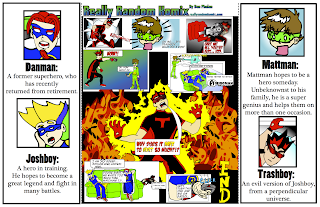
<Front/Back of the GateFold.
Inside of the GateFold>
Copyright for project images:
I will /have already produce(d) all of the images for this project
Copyright@ DanPhelan_2012
This will have Bitmap images (more elements will be added soon)
Print quote: 48hourprint.com


<Front/Back of the GateFold.
Inside of the GateFold>
Copyright for project images:
I will /have already produce(d) all of the images for this project
Copyright@ DanPhelan_2012
Wednesday, April 4, 2012
Adobe Tutorial #3

How to add a Sepia tone to a photo:
--Original Image
- Open the image in Photoshop.
- If the image is in color, go to Image > Adjust > Desaturate and skip to step 4.
- If the image is in grayscale go to Image > Mode > RGB Color.
- Go to Image > Adjust > Variations.
- Move the Fine<-->Coarse slider down one notch less than the middle.
- Click on More Yellow once.
- Click on More Red once.
- Click OK.
 And Voila! You now have a photo with nostalgia.

Copyright @me and my friend Julia, who just graduated from high school...
Source:graphicsoft.about.com
National Logo Redesign
I will be analyzing the rebranding of DC Comics.
The new brand is a complete rebranding of the entire company.
The implementation of the new brand is for the implementation of the "DC Nation" which is a combination of digital, physical print, animation and online content.
They are using a "peel" effect with the "D" peeling away from the "C", this is supposed to represent the duality of the characters in the DC Stable.
As far as the rebranding goes, I could care...
But with the rebranding comes a complete overhaul of DC Stories. Which, I do not like...
Information source: www.deadline.com
Also, any DC comic book in the last 3 months...
The new brand is a complete rebranding of the entire company.
The implementation of the new brand is for the implementation of the "DC Nation" which is a combination of digital, physical print, animation and online content.
They are using a "peel" effect with the "D" peeling away from the "C", this is supposed to represent the duality of the characters in the DC Stable.
As far as the rebranding goes, I could care...
But with the rebranding comes a complete overhaul of DC Stories. Which, I do not like...
Information source: www.deadline.com
Also, any DC comic book in the last 3 months...
Subscribe to:
Posts (Atom)